BDT6 App Download Latest Version for Android (Complete 2026 Guide)
Just Now
9MB
V.2.3
Android & iOS
22000

Description
If you are looking for a lightweight, fast, and easy-to-use mobile gaming platform for your Android smartphone, the BDT6 App has become a popular choice among mobile users. Designed with a clean interface and quick navigation, this application brings multiple mini-games, arcade challenges, and live sports updates together in one place.
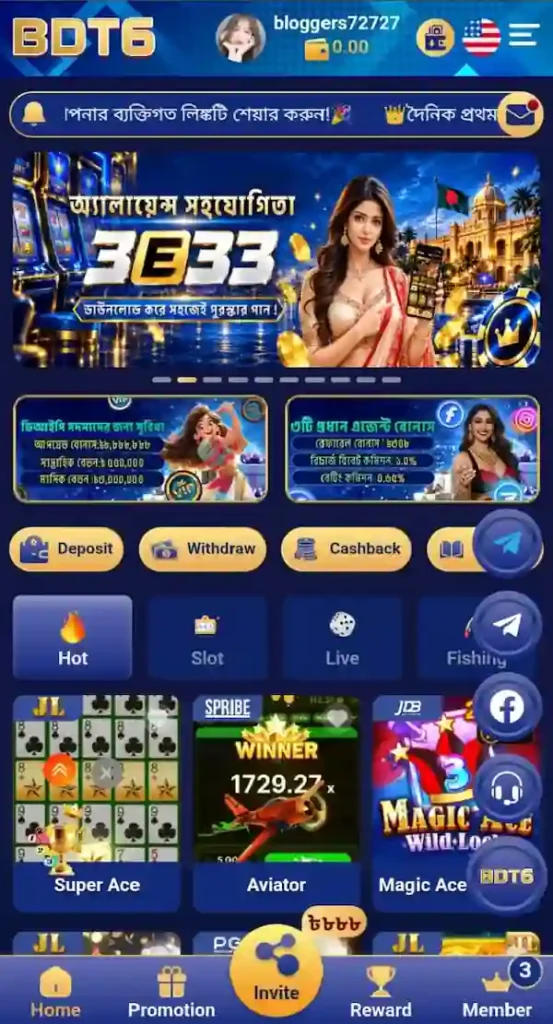
Unlike heavy mobile games that take up gigabytes of phone storage and cause lag on older devices, the BDT6 APK is built to run smoothly on almost any Android phone. In this detailed guide, we will cover everything you need to know about the BDT6 App—including its main features, system requirements, step-by-step installation process, account setup, wallet management, troubleshooting tips, and safety guidelines.Try this one also N880.
What is BDT6 App?
The BDT6 App is an Android-based mobile entertainment and gaming portal created for users who enjoy quick, interactive digital games on their phones. Instead of downloading ten different apps for different mini-games, BDT6 acts as an all-in-one hub where users can explore various casual titles, strategy challenges, and live sports tracking from a single dashboard.
The platform focuses heavily on speed and simplicity. Its layout is organized into clear categories so even first-time users can find their favorite sections without any confusion. Furthermore, it supports both English and Bangla languages, making it very accessible for regional users in South Asia.
Top Features of BDT6 App
The growing popularity of the BD T6 App comes down to several practical features that improve the daily user experience:
Ultra-Lightweight Build
The app takes very little space on your internal storage. It downloads within seconds even on standard mobile data connections and leaves plenty of room for your photos, videos, and other daily apps.
Wide Collection of Mini-Games
Inside the app, you will find a diverse library of fast-paced games. From quick crash-style reaction games and arcade challenges to fishing games and live sports scoreboards, there is plenty of variety to keep mobile gamers entertained.
Smooth & Clean User Interface
Nobody likes a cluttered screen with confusing buttons. The App uses a clean, modern dark-and-bright visual theme where menus, wallet options, and game categories are clearly labeled at the bottom and top of the screen.
Local Mobile Wallet Integration
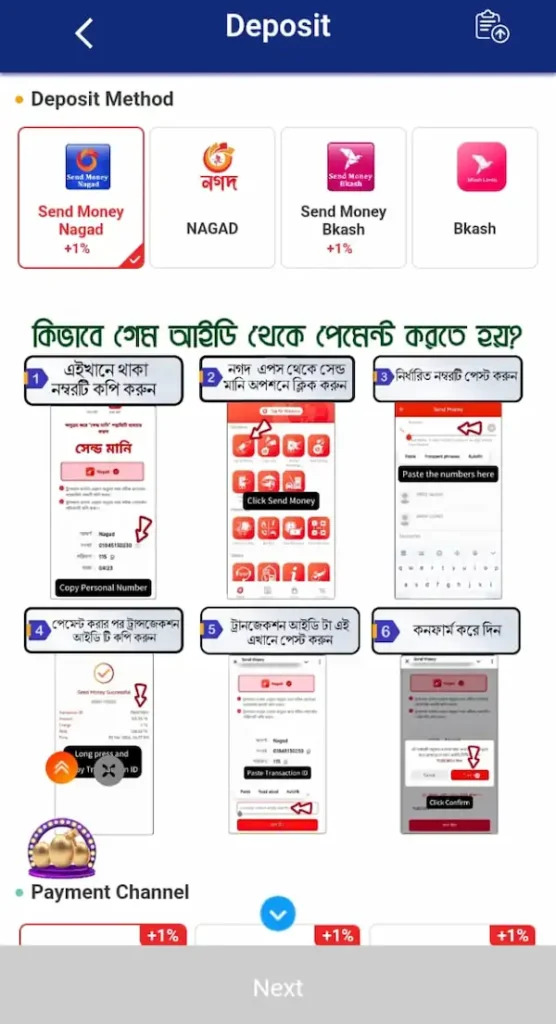
Managing your account balance is straightforward because the platform supports widely used regional mobile financial services, including bKash, Nagad, Rocket, and Upay. Users do not need international credit cards to handle transactions.
Fast Biometric Login
Typing your username and password every single time can get tiring. Once you set up your profile, the app allows you to enable fingerprint or face unlock (if supported by your phone) for quick and secure access.
Low Data Consumption
The application is optimized to use minimal mobile internet data. Even if you are in an area with an average 4G signal, pages load quickly without constant buffering or freezing.
How to Download and Install BDT6 APK on Android
Because third-party APK files are installed manually on Android devices, you need to follow a few simple steps. The entire setup takes less than two minutes:
- Download the APK File: Tap the download button on a trusted website to save the latest BD T6 file onto your device.
- Enable Unknown Sources: Open your Android phone’s Settings, go to Security or Privacy, and tap on Install Unknown Apps. Select the browser you used (such as Chrome) and toggle the permission ON.
- Locate the Downloaded File: Open your phone’s File Manager app and go to the Downloads folder.
- Start Installation: Tap on the
BDT6_latest.apkfile and press Install when the prompt appears on your screen. - Launch the App: Wait a few seconds for the installation to finish, then tap Open to launch the app from your home screen.
How to Register and Log In to Your Account
Once the app is installed on your phone, setting up your profile is very easy:
Creating a New Account
- Open the BDT6 login and tap the Register or Sign Up button on the home screen.
- Enter a unique username and create a strong password (mix letters and numbers).
- Enter your active mobile phone number so you can receive a verification code.
- Type in the SMS verification code to confirm your number.
- Tap Submit, and your account will be ready to use.
Logging In
- Open the app and select Login.
- Enter your registered username/phone number and password.
- Tap Log In to access your main dashboard. (Tip: Turn on fingerprint login in your profile settings for faster access next time).
How to Add and Withdraw Balance Safely
For users who use in-app wallet features, the BDT6 download keeps the process simple:
- Adding Funds: Go to the Wallet or Deposit tab, choose your preferred mobile wallet (bKash, Nagad, Rocket, or Upay), enter the amount you wish to add, and follow the on-screen confirmation steps.
- Withdrawing Balance: Open the Withdraw section, select your linked mobile wallet account, enter the withdrawal amount, verify your account password/PIN, and submit your request. Always make sure your wallet account number is entered accurately before confirming.
Pros and Cons of Using BDT6 App
Every mobile application has its strengths and a few limitations. Here is an honest look at both sides:
Pros
- Very small APK file size that saves phone storage.
- Works smoothly on both low-end and mid-range Android devices.
- Supports popular local payment wallets like bKash and Nagad.
- Clean layout with Bangla and English language options.
- Fast loading times and regular performance updates.
Cons
- Not available directly on the Google Play Store; requires manual APK installation.
- Requires a stable internet connection to load live games and updates.
- Not officially available as a native app for iOS (iPhone) users.
Common Installation Issues & Quick Fixes
If you run into any small technical problems while setting up the app, try these quick solutions:
- “App Not Installed” Error: This usually happens if the APK file did not download completely or if you have an older version already installed. Delete the old file, clear some space, and download a fresh copy.
- Installation Blocked by Phone: Make sure you have enabled “Install Unknown Apps” for your web browser in your Android security settings.
- App Lagging or Crashing: Close unnecessary background apps, restart your phone, or clear the app cache via Settings > Apps > BDT6 > Storage > Clear Cache.
- Forgot Login Password: Use the “Forgot Password” link on the login screen to reset your password using your registered mobile number.
Important Security Tips for Android Users
Whenever you install APK files on your Android phone, keeping your device and personal data safe should always be your top priority:
- Check Permissions Carefully: A gaming app only needs basic internet and storage access. If an APK ever asks for permission to read your SMS messages, contacts, or call logs, do not install it.
- Never Share Your Password or OTP: Keep your login password and SMS verification codes strictly private. Official support teams will never ask for your password.
- Avoid Public Wi-Fi for Transactions: Always use your personal mobile data or a trusted home Wi-Fi network when logging in or managing wallet transactions.
- Stick to Trusted Sources: Only download APK files from reliable portals and avoid modified versions shared in random messaging groups.
Frequently Asked Questions
Is the BDT6 App free to download?
Yes, downloading and installing the BDT6 APK file on your Android device is completely free.
Why do I need to enable Unknown Sources to install the APK?
Android requires this permission whenever you install an application file directly from a browser instead of the Google Play Store. You can turn it back off after installation.
Is BDT6 an earning app?
It is sometimes promoted as an earning or reward app, but its available information also links it with gaming and betting related activities. It should not be treated as a guaranteed income source.
Final Verdict
The BDT6 App offers quick mobile mini-games, arcade challenges, and sports entertainment with easy bKash and Nagad wallet support.
Since fake lookalike sites exist online, always download the BD T6 from a trusted source and read the wallet rules carefully before adding funds. Never treat this app as a guaranteed way to earn money—financial loss is always possible. Play and use this app strictly at your own risk, keep your account details safe, and only spend what you can afford to lose.
Download links
How to install BDT6 App Download Latest Version for Android (Complete 2026 Guide) APK?
1. Tap the downloaded BDT6 App Download Latest Version for Android (Complete 2026 Guide) APK file.
2. Touch install.
3. Follow the steps on the screen.